
iVueit Review: Earn Cash From Local Property Photos and Surveys
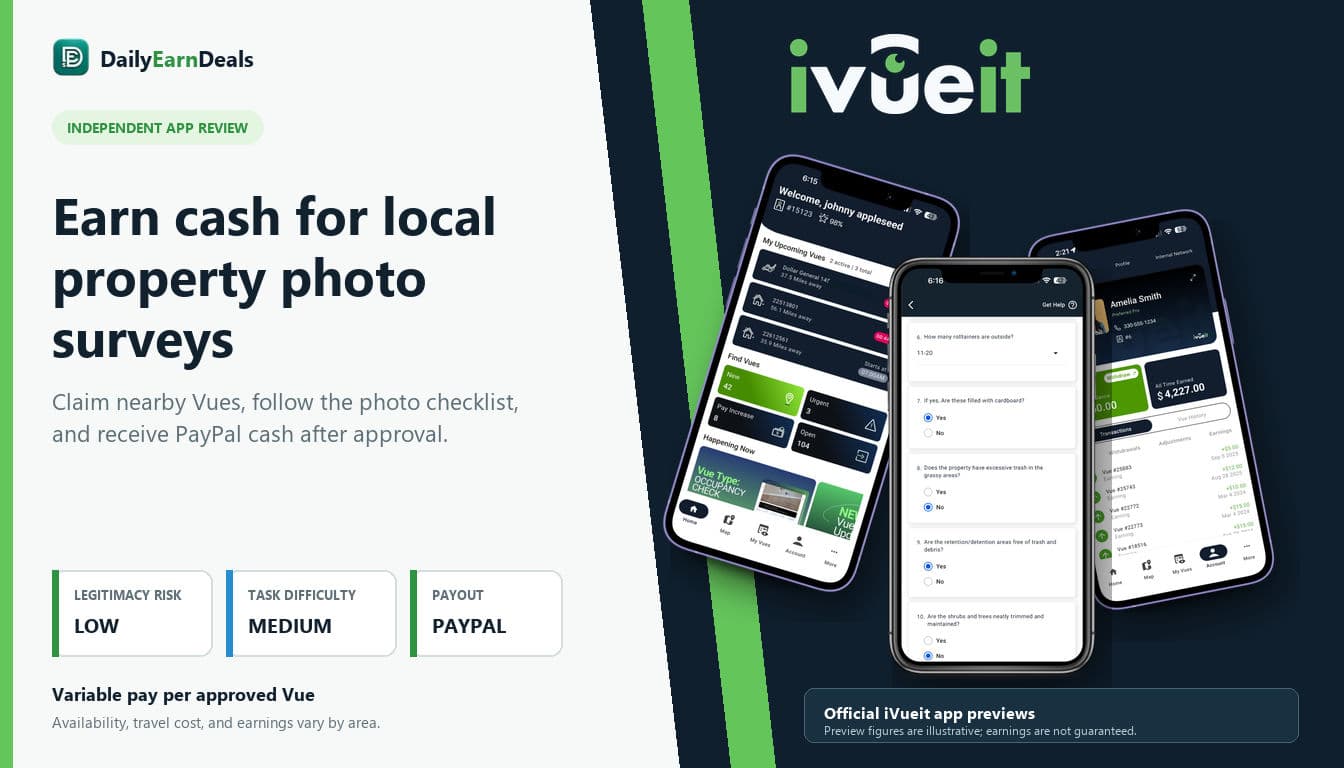
iVueit pays eligible users to visit nearby properties, take requested photos, and complete short inspection surveys. It is a legitimate local gig app, but task availability and earnings depend heavily on your area and submission approval.
 Reviewed by 𝔸𝕓𝕕𝕆 Essen
Requirements
Be at least 18 years old.
Live in an eligible U.S. or Canadian service area.
Have a compatible iPhone or Android smartphone with a working camera.
Allow precise location access when required for maps and geotagged submissions.
Have reliable transportation for assignments that are not within walking distance.
Create an iVueit Vuer account using accurate information.
Have a PayPal account connected to the phone number used for iVueit withdrawals.
Follow each Vue's photo, survey, access, and deadline instructions.
Be prepared to show an authorization letter or in-app digital ID when provided.
Complete identity verification or a background check if a specific Vue requires it.
Pay your own fuel, parking, phone, equipment, insurance, and tax expenses.
How it works
What is iVueit?
iVueit is a mobile micro-job platform for location-based property inspections. Businesses, property managers, retailers, insurers, and other clients use the service when they need current photos or answers about a physical location. The app sends these assignments, called "Vues," to nearby independent contractors known as "Vuers."
Instead of answering surveys from home, you usually travel to a specified commercial or residential property. A Vue may ask you to photograph landscaping, signs, lighting, parking areas, exterior damage, store displays, or another condition that a client wants documented. Some assignments also include short questions, video steps, or a request to speak with an on-site manager.
This is real gig work rather than passive income. You choose whether to claim an available task, but you are responsible for reaching the location, following every instruction, meeting the deadline, and covering your own travel costs. iVueit's terms classify Vuers as independent contractors, not employees.
How iVueit works
- Download the iVueit app and create a Vuer account.
- Allow the location access needed to display nearby assignments.
- Open the map and review available Vues in your area.
- Check the location, deadline, required photos, questions, and displayed pay.
- Claim only a Vue that you can complete safely and on time.
- Travel to the property and follow the in-app checklist carefully.
- Submit the requested photos, videos, and survey answers through the app.
- Wait for the quality-control review.
- Receive the reward in your Vuer Wallet after the Vue is approved.
- Withdraw the available balance to the PayPal account linked to your phone number.
Vues can be claimed by other users, so an assignment may disappear if somebody accepts it first. Some tasks are reserved temporarily for users with Preferred or Elite status. Certain assignments may also require an approved background check.
How much can you really earn?
Pay varies by assignment and is shown in the app before you claim a Vue. Official iVueit sources do not all display the same range: the current iPhone listing advertises $5-$100 for a successfully completed Vue, the Google Play listing advertises $5-$50, and an iVueit help article states that successfully completed Vues pay $7-$50 depending on the task type and complexity.
Treat these figures as advertised ranges, not typical or guaranteed earnings. A simple exterior photo task may pay less than an assignment requiring many photos, detailed questions, manager contact, or interior access. The amount that matters is the amount displayed for the specific Vue in your app.
Your real profit is also lower after fuel, parking, vehicle wear, mobile data, and travel time. A task with attractive headline pay may not be worthwhile if the property is far away or the instructions are unusually demanding. iVueit is best viewed as occasional extra income, especially when a Vue is already close to your normal route. It should not be presented as a salary or predictable daily income.
Payout
iVueit officially lists PayPal as its payout method. After a submission is accepted, the reward is credited to the in-app Vuer Wallet. You can open the Wallet, select your balance, and request a withdrawal to the PayPal account connected to the phone number used for your iVueit account.
The company's help pages say to allow up to 24 hours for quality-control review and up to 24 hours for a requested PayPal payment. Another withdrawal article describes the transfer as instant, while the Vuer agreement allows additional processing time after confirmation. For accurate expectations, allow for review and processing rather than promising an instant payment.
There is no publicly stated universal cash-out threshold in the official payment instructions reviewed for this article. The instructions say users may select the available amount they want to withdraw. Payment is only due for work that satisfies the client's requirements, so rejected, incomplete, late, or failed submissions may not be paid.
Who it is best for
iVueit may suit:
- Adults in the United States or Canada who see active Vues nearby.
- Delivery drivers or other local gig workers who already travel around town.
- People comfortable taking clear, accurately framed property photos.
- Users who can read detailed instructions and meet strict deadlines.
- People with PayPal who want occasional local micro-jobs.
It is less suitable for people without reliable transportation, users in areas with few assignments, or anyone expecting guaranteed remote income. Some properties may involve access restrictions or questions from staff, so you should never ignore posted rules or enter an area without authorization.
How to start
1. Install the official iVueit app from Google Play or Apple's App Store.
2. Register with accurate personal and contact information.
3. Read the Vuer agreement and review the in-app safety and training materials.
4. Enable the location and notification settings required for nearby Vue alerts.
5. Connect the PayPal account associated with the phone number used to sign in.
6. Review the full scope, deadline, travel distance, and pay before claiming a Vue.
7. Complete the checklist at the correct location and submit the work before time expires.
8. Monitor the app for approval, correction requests, and wallet credit.
Tips to earn more
- Calculate mileage, fuel, parking, and estimated task time before accepting.
- Prioritize Vues close to places you already plan to visit.
- Read the entire checklist before taking the first photo.
- Clean your camera lens and check every image for blur, glare, and missing details.
- Keep location services active when required so photos can be geotagged correctly.
- Do not leave submission until the final minutes, especially where mobile service is weak.
- Use the app's letter of authorization or digital ID badge when a task provides one.
- Contact support from a safe location if instructions conflict with site conditions.
- Maintain accurate work and avoid unnecessary cancellations to protect your Vuer rating.
- Keep your own mileage, expense, and payment records for tax purposes.
Difficulty level: Medium
The app is straightforward, but the work can require travel, precise photos, strict deadlines, manager contact, or access to unfamiliar properties. Difficulty is separate from scam and payout risk.
Important note
Never trespass, enter a restricted area, photograph people unnecessarily, or continue if a location feels unsafe. Confirm the address and task authorization, use any letter of authorization supplied in the app, and leave the site if staff or law enforcement instruct you to do so. Your travel costs are not reimbursed, and approved work is treated as independent-contractor income.
Pros & cons
Pros
- Legitimate platform with active official iOS and Android listings.
- The pay and required scope are visible before a Vue is claimed.
- No resume or professional photography qualification is generally needed.
- Flexible schedule with freedom to accept or decline available work.
- PayPal withdrawals are documented in the official help center.
Cons
- Availability can be sparse and varies significantly by location.
- Fuel, parking, travel time, and vehicle wear reduce the real profit.
- Payment depends on quality-control approval and full compliance with instructions.
- Some users report app glitches, failed submissions, low pay, or slow support.
- Certain Vues may involve background checks, manager contact, or property-access concerns.
Our verdict
iVueit is a legitimate option for occasional local micro-jobs, especially when assignments are close to places you already visit. It can pay real money through PayPal, but availability is inconsistent and careful task completion is essential, so treat it as supplemental income rather than dependable work.
Frequently asked questions
Is iVueit legit?
Yes. iVueit is an established property-inspection platform with active official app-store listings, documented PayPal payment instructions, and thousands of public ratings. Like any gig app, individual experiences and task availability vary.
How does iVueit pay users?
Approved earnings are credited to the Vuer Wallet and can be withdrawn through PayPal.
How much does iVueit pay per Vue?
The amount varies by task. Official sources advertise ranges between $5 and $100, but the exact amount displayed before claiming a Vue is the figure that applies to that assignment.
Is iVueit available worldwide?
No. iVueit's official help center says the Vuer app is available in the United States and Canada. Assignments are not guaranteed in every city.
Does iVueit have a minimum withdrawal?
The official withdrawal instructions reviewed for this article do not state a universal minimum. They say users can select an available balance amount to withdraw.
How long does iVueit take to pay?
Official help information says quality review can take up to 24 hours and a PayPal request can take up to another 24 hours. Delays may occur if a submission needs review or correction.
Can an iVueit submission be rejected?
Yes. Payment applies to Vues that meet the client's requirements. Missing photos, poor image quality, incorrect information, late submission, or failure to follow access instructions can prevent approval.
Does iVueit require a background check?
Not for every Vue. The app identifies certain Vues that require an approved background check, and its terms allow identity verification in some circumstances.
Do I need a car for iVueit?
A car is not stated as a universal account requirement, but reliable transportation is practical because most assignments require visiting specific properties. Travel expenses are your responsibility.
Is iVueit passive income?
No. It is active gig work that requires travel, photography, survey responses, and approval.
Disclosure: some links on this page are affiliate or referral links — we may earn a commission at no extra cost to you. Rewards and eligibility are set by the offer provider and can change. Always check the provider's current terms before joining. See our affiliate disclosure.
Official page: ivueit.com/become-a-vuer/
Report this offer as expired or wrong
Similar offers

iSecretShop Review 2026: Mystery Tasks, Pay & Requirements
iSecretShop review: understand mystery-shopping tasks, provider-set pay, payment timing, requirements, and assignment risks.

Premise Review 2026: Local Tasks, Surveys & Payouts
Premise review: how local tasks, surveys, photo work, country availability, payouts, privacy, and task rejection rules work.

Field Agent Review 2026: Local Tasks, Cash-Outs & Risks
A fact-checked Field Agent review covering local retail tasks, $3 cash-out, verified direct deposit, PayPal limitations, timing, eligibility, and risks.
Comments(0)
Comments come from visitors using self-chosen display names — they are not verified accounts and don't represent DailyEarnDeals. Every comment is reviewed by a person before it appears.